
Are you curious about why I chose the Skool.com platform for my creative faith community?
This post will answer that… Plus give you
Simple Tips for Getting Started with Skool, even if Technology Isn’t Your Thing
For years, I created Scripture printables, coloring pages, lettering resources, Bible study tools, and other creative goodies designed to help women grow in faith.
At first, I offered many of these resources on Etsy and in a traditional online shop.
But over time, I noticed something.
Women loved downloading printables—sometimes lots of them—but many of those beautiful pages never made it out of the download folder.
Maybe you can relate. 😊
You see something inspiring, download it with the best intentions, and think:
“I’m going to do this when I have more time.”
But life gets busy. The file gets forgotten. And instead of helping you connect with God, it becomes one more thing sitting on your computer.
That is one of the biggest reasons I chose to host Delight in the Word Sisters on Skool.
I didn’t want to simply give women more things to download.
I wanted to create a welcoming place where women would be encouraged to actually use the resources, engage with Scripture, try new creative practices, ask questions, and grow in faith together.
Why Skool Instead of Just a Printable Shop?
A printable can be a wonderful starting point. But sometimes we need more than a page.
We may need someone to show us how to use it. We may need permission to begin imperfectly. We may need encouragement when we feel stuck.
We may need to see what someone else created and think:
“Oh! I could do that.”
Inside my Skool community, I can place printable resources alongside video tutorials, written instructions, prompts, and supporting lessons in an organized Classroom. Skool’s Classroom is designed to hold lessons, videos, guides, files, templates, and other resources in one place.
That means you don’t just receive a printable.
You can also receive:
- A video showing you how to use it
- Suggestions for adapting it to your own style
- Simple creative prompts
- Scripture reflection questions
- Encouragement from other members
- A place to share what you made
- Help when you have a question
And that support makes a difference.
I’ve seen many more women complete activities, share their projects, try something new, and talk about what God is teaching them since moving the resources into a community setting.
My goal is not to SELL creative faith resources.
My mission is to help women USE creativity to CONNECT with God and His Word. So that’s why I am loving the Skool platform!
Why I Chose Skool
Before choosing Skool, I explored and tried several different community platforms.
I wanted something that would allow me to combine:
- Community conversation
- Organized courses and resources
- Video tutorials
- Printable downloads
- Live gatherings
- Member interaction
But it also needed to be simple enough that women who don’t consider themselves “techy” could use it without feeling overwhelmed. This was VERY important to me!
I chose Skool because I found it to be the most user-friendly option for the kind of community I wanted to create. And my members have confirmed that it is.
It keeps the main parts of the experience together:
The Community

This is where members can read posts, ask questions, share projects, encourage one another, and join conversations.
And most importantly, they aren’t creating alone.
The Classroom
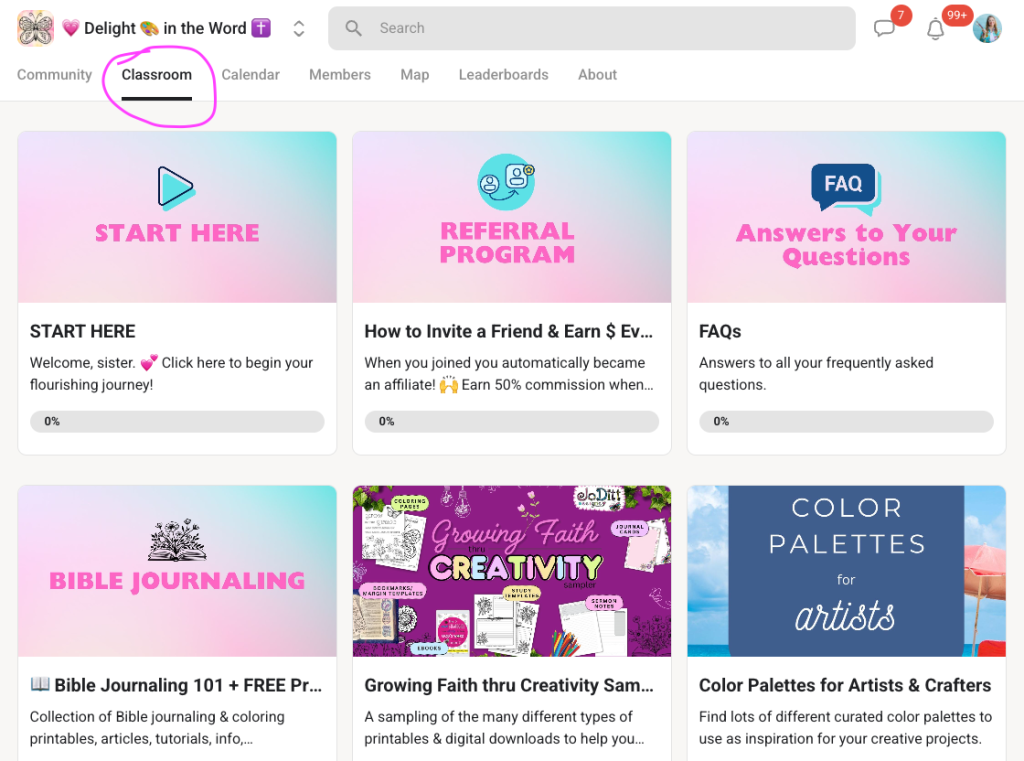
This is where I organize Monthly Missions, Bible studies, tutorials, printables, replays, and other resources. Skool allows creators to organize lessons into pages and folders and add videos, downloadable files, links, and transcripts.
Instead of trying to remember whether something was shared through email, Facebook, a course platform, a file-delivery service, or a video link, members have one central place to visit.
The Calendar
This is where members can find upcoming Connection Calls and other scheduled events. Skool also supports live calls within the browser or app, along with screen sharing, chat, and recording options. This makes it super-easy to have live video calls, both for me and for my members. I don’t have to pay for another app to host the calls, and my members don’t have to have a different app in order to attend the calls.
What My Members Say They Love

My members especially enjoy being surrounded by other women who want to grow in faith through creativity.
They can share a coloring page, a journal entry, a lettering project, a prayer, a question, or a small victory—and receive encouragement from women who understand why it matters.
That interaction is one of the most valuable parts of the community.
Someone may think:
“My page isn’t good enough to share.”
Then she sees another member bravely sharing an imperfect first attempt.
Someone else may say:
“I never thought of using that printable in a junk journal.”
Another member may post:
“This Scripture was exactly what I needed today.”
Those moments help us remember that creativity is not a competition.
It is a pathway to reflection, delight, healing, learning, worship, and connection.
Is Skool Hard to Use?
I understand why some women feel hesitant about joining another online platform.
Technology can feel frustrating—especially when every website seems to work differently.
But Skool is intentionally simple.
You do not have to learn dozens of complicated features before you can participate.
Once you join, you can begin with just three places:
- Community
- Classroom
- Calendar
That’s enough to get started.
You don’t have to understand everything on your first day.
You can explore one small step at a time.
Join us inside Delight in the Word Sisters today!
Simple Tips for Using Skool
1. Complete Your Profile
When you create your Skool account, you’ll be asked to add a profile picture and a short bio. Skool requires these because names and faces help communities feel more personal and trustworthy, as well as deterring spammers. You can upload a JPG or PNG or use your Facebook profile photo. While I prefer that women use a photo of them so I can put a face with a name, you can use a photo of a flower or a pet or whatever if you prefer.
Here’s mine:
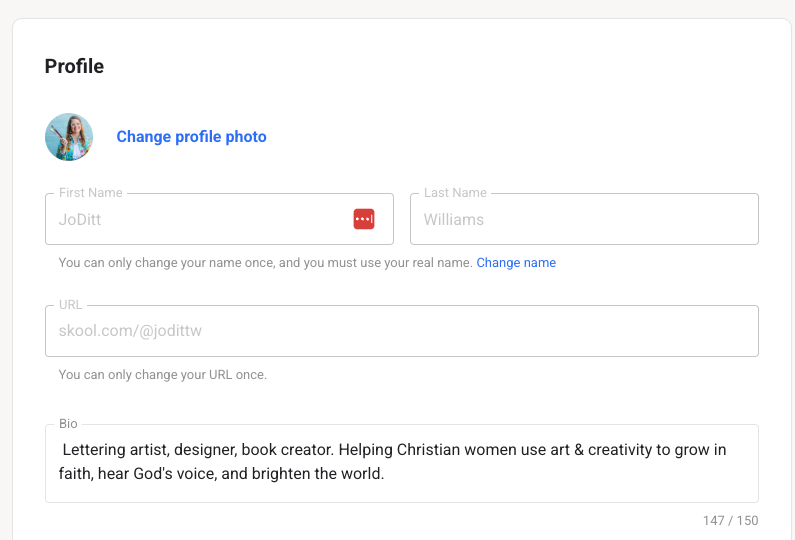
Your bio doesn’t need to be complicated.
You might write something like:
“I’m a wife, grandmother, and beginner Bible journaler from Texas. I love colored pencils and want to grow closer to God through creativity.”
That’s plenty.
2. Start in the Classroom
When you join Delight in the Word Sisters, visit the Classroom tab. Then click on the START HERE course.
Then you can explore the other courses in the Classroom, where you’ll find organized resources such as:
- The current Monthly Mission
- Bible Journaling 101
- Bible Lettering 101
- Growing Faith thru Creativity Printable Kit for Beginners
- Video tutorials
- All the past Monthly Missions
You do not need to complete everything.
Choose one lesson or one resource that meets you where you are.
3. Visit the Community Feed
The Community tab is where the conversations happen.
Here you can:
- Read announcements (pinned at the top)
- Respond to prompts
- Ask a question
- Share what you are creating
- Encourage another member
- Celebrate a small win
You don’t have to create a brand-new post right away.
You can begin by leaving a comment on someone else’s post.
Even a simple:
“This encouraged me today.”
or
“I love the colors you chose.”
is a beautiful way to connect.
Next, check out the Categories (directly below the box that says “Write Something”.) This sorts the posts into categories so you don’t get overwhelmed with ALL the posts.
This allows you to view everything related to the current Monthly Mission in one spot, or see what other members have created in the “Show & Tell” category, or ask for help or prayer in the “Help & Prayer” category, etc.
4. Check the Calendar
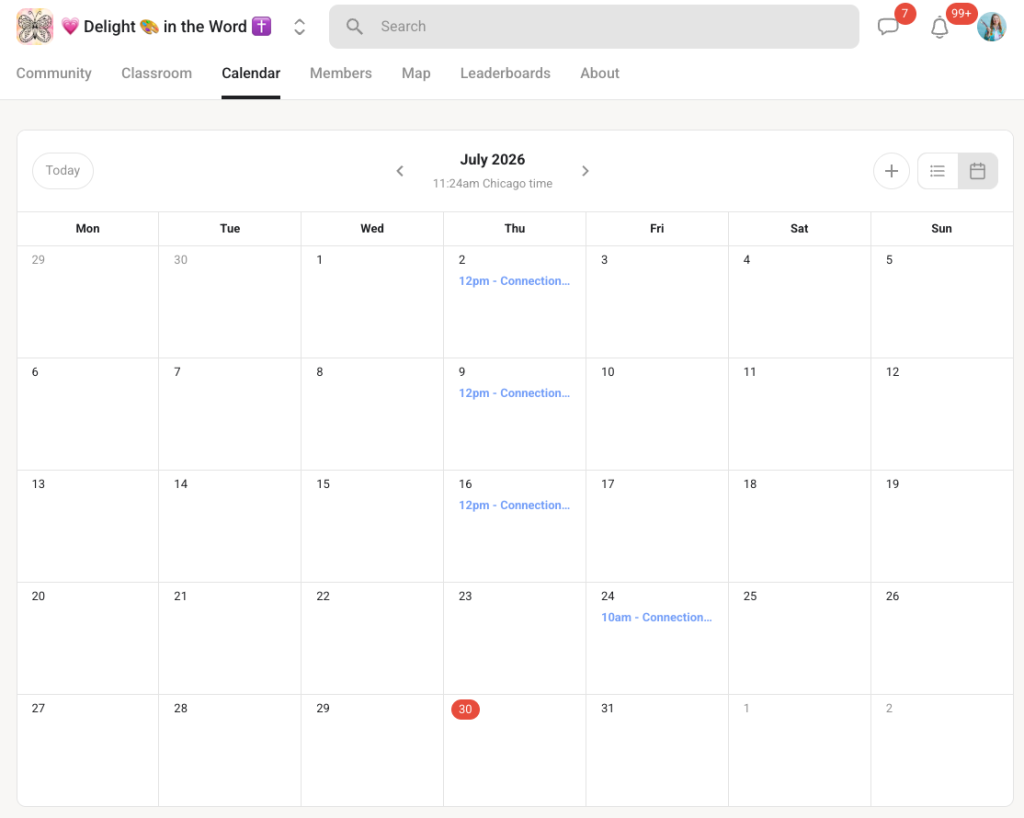
Use the Calendar tab to see upcoming gatherings, workshops, Connection Calls, or other special events.
You do not need to remember every date from an email. You can return to the Calendar whenever you want to see what is coming next.
And to attend a Connection Call, all you need to do is click the link on the Calendar. Easy-peasy!
5. Adjust Your Notifications
You can choose how often Skool contacts you.
Click your profile picture, select Settings, and then choose Notifications.
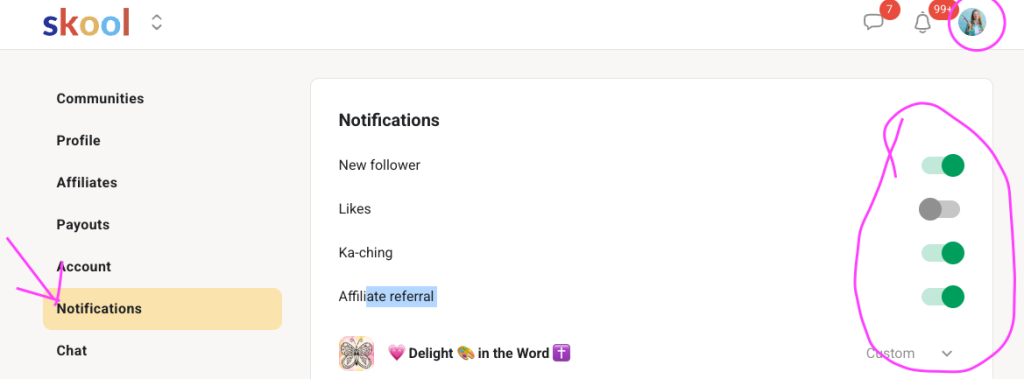
Depending on the group and your preferences, you can adjust announcements, daily activity summaries, weekly digest emails, event reminders, and other notifications. You can also use the bell on an individual post when you want to follow that particular conversation.
My suggestion is to keep community announcements and event reminders turned on so you don’t miss important resources or activities.
You can turn down the less important notifications, such as likes, or new followers, if your inbox begins to feel crowded.
6. Use the Search Feature
Before assuming something is lost, try searching for a keyword.
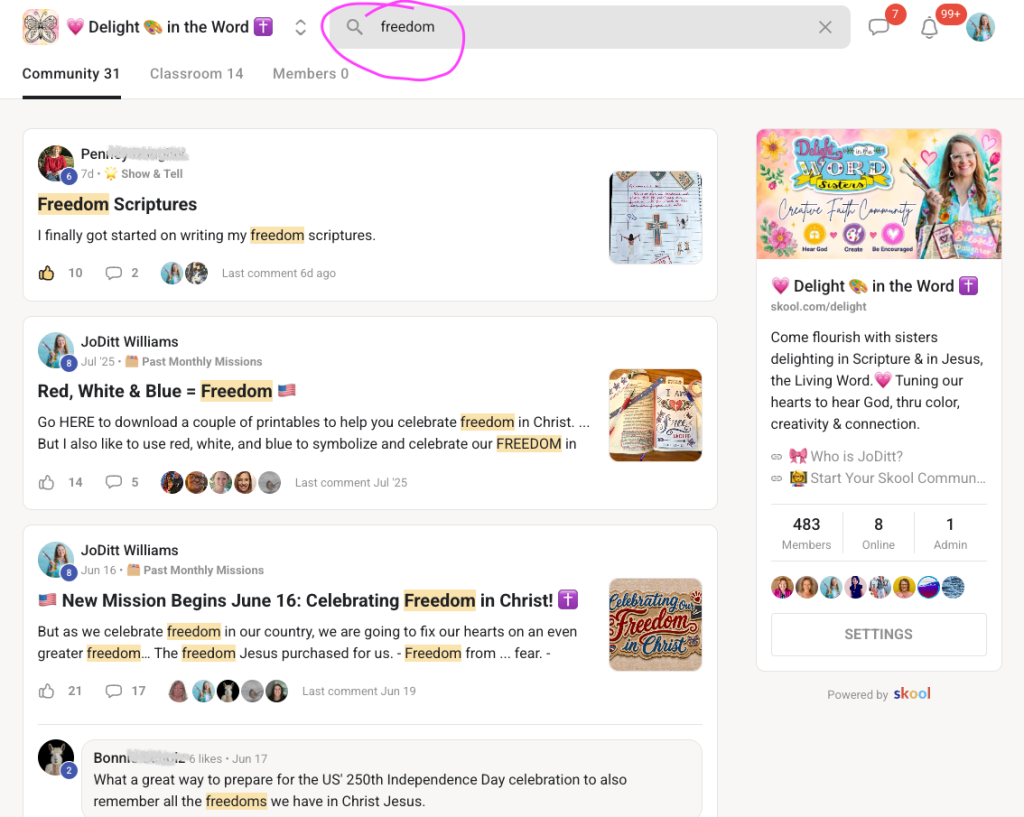
For example:
- Psalm 119
- Coloring
- Lettering
- Freedom
- Prayer
- Watercolor
You may find an earlier lesson, conversation, tutorial, or printable that is exactly what you need.
7. Use Skool on the Device That Feels Easiest
Some women prefer using Skool on a desktop or laptop because the larger screen makes it easier to see lessons and download files.
Others prefer the mobile app for reading posts, commenting, receiving reminders, and staying connected.
You are not required to do everything from your phone.
You might use your computer for downloading and printing resources, then use your phone for community conversations.
Choose what feels easiest for you.
8. Ask for Help
Please don’t sit quietly feeling confused.
Post your question in the community or comment underneath the lesson you’re working through.
Chances are good that someone else has wondered the same thing.
One of the reasons I chose a community platform is so I can answer questions quickly and other members can share what has worked for them.
You do not have to figure everything out alone.
You Don’t Have to Keep Up with Everything
This may be the most important tip of all.
You are not expected to:
- Download every printable
- Watch every video
- Join every call
- Complete every project
- Comment on every post
The community is here to support your relationship with God—not to give you another source of pressure.
Begin with one Scripture.
Choose one creative activity.
Watch one tutorial.
Share one small discovery.
Let that be enough.
Our Next Creative Journey
Our upcoming Monthly Mission is called:
Discovering Delight in Creativity
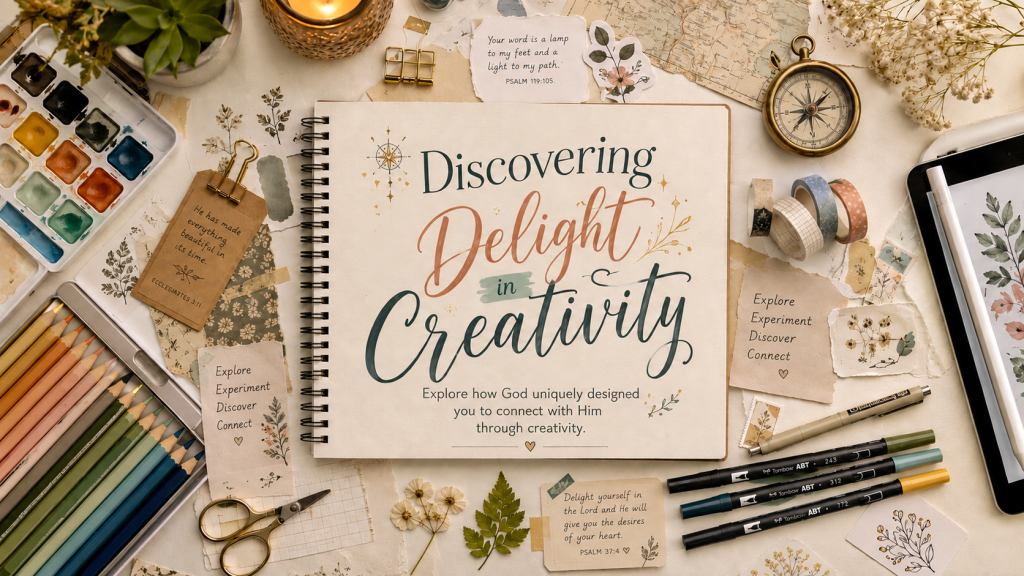
During this mission, we’ll explore different ways of engaging with Scripture creatively:
- Color the Word
- Layer the Word
- Letter the Word
- Illustrate the Word
You’ll be encouraged to:
Explore • Experiment • Discover • Connect
This is not about becoming a perfect artist.
It is about discovering how God uniquely designed you to connect with Him through creativity.
Some women may discover that coloring helps them slow down and meditate. Others may connect through collage, watercolor, or washi tape.
Some may love writing and lettering Scripture. Others may enjoy doodling, word pictures, expressive lettering, or creating digitally.
There is no single right pathway.
We’re going to explore together and pay attention to what helps each of us delight in God and His Word.
Come Join Us
*Share or pin the image below to invite other women too!
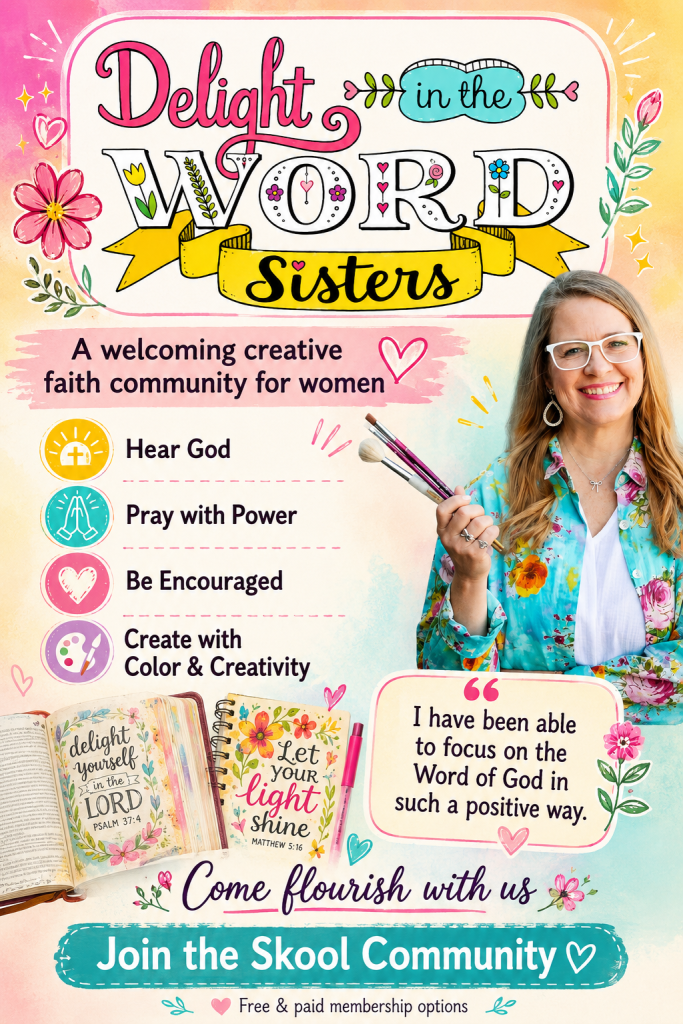
Inside Delight in the Word Sisters, you’ll find a welcoming community of Christian women growing in faith through Scripture, color, creativity, and connection.
Free members can participate in community conversations, receive the Creativity Bible Reading Plan, follow weekly prompts, watch public tutorials, and try a basic project.
Premium and VIP members will also receive the Creative Discovery Journal and an expanding printable and digital creative kit throughout the month.
Come on a creative discovery journey with Jesus.
You don’t need expensive supplies. You don’t need artistic experience. And you definitely don’t need to be good with technology.
Bring your Bible, a willing heart, and whatever creative supplies you already have.
We’ll take the journey one simple step at a time. 🌿🎨


